Best of
The Best Portable Laptop Chargers (2027)
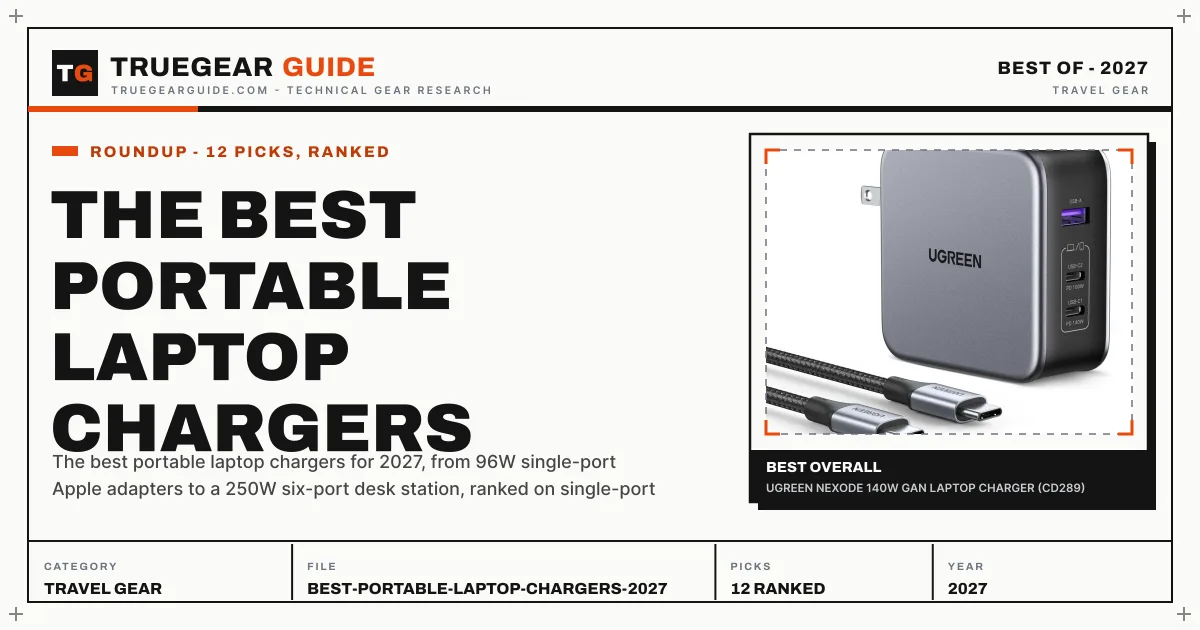
The best portable laptop chargers for 2027, from 96W single-port Apple adapters to a 250W six-port desk station, ranked on single-port wattage, port splits and travel size.
The short answer
For most travellers the right laptop charger is a 100W or 140W multi-port GaN brick. If your laptop is a 14 inch machine, the UGREEN Nexode 100W CD226 and the Anker 737 at 120W cover it with ports to spare. If you run a 16 inch MacBook Pro or a heavy Windows laptop, step up to a true 140W charger: the UGREEN Nexode 140W CD289 and the Anker A2697 both deliver 140W on a single port and include the 240W cable. MacBook owners who want Apple's own adapter should buy the Apple 140W or 96W, and multi-laptop desks should look at the Satechi 165W or the Anker Prime 250W.
Our top picks at a glance
- UGREEN Nexode 140W GaN Laptop Charger (CD289)Full 140W PD 3.1 for 16 inch laptops, with a 240W cable already in the box.Best overall
- Anker 737 GaNPrime 120W Charger (A2148)The 120W travel classic: a laptop port plus two spare ports in a foldable brick.Best for travel
- Anker 140W 4-Port Charger (A2697)Anker's 140W four-port answer: two 140W ports, a display, and a cable in the box.Best 140W with a display
- Baseus PicoGo 140W Charger (AH11)A 140W four-port brick with a smart display, built for a laptop plus three more devices.Best four-port 140W
- UGREEN Nexode 100W GaN Charger (CD226)Four ports and a full 100W laptop charge at the friendliest price in this guide.Best budget 100W
The picks, ranked
| # | Product | Award | Total output | Ports | USB-C1 output | USB-C2 output | USB-A output |
|---|---|---|---|---|---|---|---|
| 1 | UGREEN Nexode 140W GaN Laptop Charger (CD289) | Best overall | 140W max | 2x USB-C, 1x USB-A | 140W (28V/5A, PD 3.1, PPS) | 100W | Up to 22.5W |
| 2 | Anker 737 GaNPrime 120W Charger (A2148) | Best for travel | 120W max | 2x USB-C, 1x USB-A | - | - | - |
| 3 | Anker 140W 4-Port Charger (A2697) | Best 140W with a display | 140W max | 3x USB-C, 1x USB-A | - | - | Up to 33W |
| 4 | Baseus PicoGo 140W Charger (AH11) | Best four-port 140W | 140W max | 3x USB-C, 1x USB-A | - | - | Up to 30W |
| 5 | UGREEN Nexode 100W GaN Charger (CD226) | Best budget 100W | 100W max | 3x USB-C, 1x USB-A | - | - | Up to 22.5W |
| 6 | Apple 140W USB-C Power Adapter (MLYU3AM/A) | Best for MacBook Pro 16 inch | 140W | 1x USB-C | - | - | - |
| 7 | Apple 96W USB-C Power Adapter (MW2L3AM/A) | Best for MacBook Pro 14 inch | 96W | 1x USB-C | - | - | - |
| 8 | Anker 100W Smart Display Charger (B121B) | Best smart display charger | 100W max | 2x USB-C, 1x USB-A | - | - | Up to 33W |
| 9 | AOHI Youth 140W GaN+ Charger (AOC-C017) | Best budget 140W | 140W max | 2x USB-C, 1x USB-A | 140W (28V/5A, PD 3.1, PPS) | 100W | Up to 22.5W |
| 10 | UGREEN Nexode Pro 100W 3-Port Charger (X757) | Best slim 100W | 100W | 2x USB-C, 1x USB-A | 100W alone | 30W alone | Up to 22.5W |
| 11 | Satechi 165W USB-C 4-Port GaN Charging Station (ST-UC165GM) | Best for shared desks | 165W | 4x USB-C | - | - | - |
| 12 | Anker Prime Charger 250W 6-Port GaNPrime (A2345) | Best for multi-laptop desks | 250W | 4x USB-C, 2x USB-A | 140W (PD 3.1) | - | Up to 22.5W each |
Best overall
UGREEN Nexode 140W GaN Laptop Charger (CD289)
Full 140W PD 3.1 for 16 inch laptops, with a 240W cable already in the box.

Strengths
- USB-C1 delivers the full 140W under PD 3.1, matching the fastest laptop charging standard here
- A second USB-C port reaches 100W, so two laptops can charge at useful speeds together
- A 5 ft 240W USB-C cable is included, so the headline speed works out of the box
- Foldable plug keeps a 10.6 oz, 140W brick packable for travel
Limitations
- At 10.6 oz it is noticeably heavier than the 100W bricks in this guide
- The USB-A port is capped at 22.5W, a phone speed next to the USB-C ports
- Three devices at once pull the total down, so the 140W figure is a single-port story
What owners report
Most praised
- It fast charges a 16 inch laptop at the same speed as the maker's own 140W adapter
- The included 240W cable is the detail owners keep mentioning, since it saves a separate purchase
- Two laptops at once is a real use case owners use on shared desks
Common complaints
- The weight is the first thing owners notice after years of lighter bricks
- The brick runs warm at sustained 140W output
- Owners wish the USB-A port kept pace with the USB-C ports
| Total output | 140W max |
|---|---|
| Ports | 2x USB-C, 1x USB-A |
| USB-C1 output | 140W (28V/5A, PD 3.1, PPS) |
| USB-C2 output | 100W |
| USB-A output | Up to 22.5W |
| Charging tech | GaN, PD 3.1, PPS |
| Size | 2.99 x 2.99 x 1.38 in |
| Weight | 10.6 oz |
| In the box | Charger, 5 ft 240W USB-C cable |
Best for: 16 inch MacBook Pro and Windows laptop owners who want true 140W fast charging.
Skip if: Your laptop charges at 100W or below; the extra 40W buys nothing and the brick is heavier.
Best for travel
Anker 737 GaNPrime 120W Charger (A2148)
The 120W travel classic: a laptop port plus two spare ports in a foldable brick.

Strengths
- A single USB-C port delivers up to 100W, enough for most 14 inch laptops at full speed
- 120W total across two USB-C ports and one USB-A port covers a laptop, a phone and a tablet from one outlet
- GaNPrime design with PowerIQ 4.0 and ActiveShield 2.0 keeps the brick compact for its wattage
- Foldable plug and a 6.6 oz body pack flat in a laptop sleeve or a carry-on pocket
Limitations
- No USB-C cable in the box, so a 100W-rated cable is a separate purchase
- The 120W total is shared, so charging three devices at once pulls the laptop port down
- Only the headline USB-C port reaches 100W; the other ports serve phones and accessories
What owners report
Most praised
- It charges a 14 inch laptop at full speed from a brick that fits a jacket pocket
- The foldable plug survives daily bag life without bending or snagging
- Owners who travel with it say one outlet now covers their whole kit
Common complaints
- Buyers notice the missing cable only when they first plug in a laptop
- Charging a laptop and a tablet together slows the laptop more than expected
- The brick runs warm when all three ports are loaded at once
| Total output | 120W max |
|---|---|
| Ports | 2x USB-C, 1x USB-A |
| Single USB-C | Up to 100W |
| Charging tech | GaNPrime, PowerIQ 4.0, ActiveShield 2.0, PPS |
| Plug | Foldable |
| Size | 3.1 x 1.3 x 1.7 in |
| Weight | 6.6 oz |
| In the box | Charger, silicone stabilizer, guide; no cable |
Best for: Travellers who charge a laptop plus a phone from one outlet and want a proven 100W single port.
Skip if: You run two laptops at once; the 120W total splits, and only one port carries the full 100W.
Best 140W with a display
Anker 140W 4-Port Charger (A2697)
Anker's 140W four-port answer: two 140W ports, a display, and a cable in the box.

Strengths
- USB-C1 and USB-C2 each reach 140W alone under PD 3.1
- A third USB-C port delivers up to 40W for phones and accessories
- Colour display with touch controls shows live output per port
- A 5 ft 240W USB-C cable is included, so the top speed works straight away
Limitations
- The third USB-C port is capped at 40W, so it cannot serve a second laptop
- The USB-A port tops out at 33W, a phone speed beside the headline ports
- At 9.7 oz it is heavier than the 100W bricks most travellers carry
What owners report
Most praised
- It charges a 16 inch laptop at full speed while a phone charges beside it
- The display shows which port is actually delivering, which ends cable arguments
- Owners praise the included 240W cable as a real cable, not a short token
Common complaints
- The third USB-C port disappoints owners who hoped for a second laptop port
- The brick is heavy enough that owners notice it in a slim laptop sleeve
- Touch controls can be triggered by accident when the brick is handled
| Total output | 140W max |
|---|---|
| Ports | 3x USB-C, 1x USB-A |
| USB-C1/C2 output | Up to 140W each alone |
| Third USB-C | Up to 40W |
| USB-A output | Up to 33W |
| Display | Colour display with touch controls |
| Charging tech | GaN, PD 3.1, ActiveShield 4.0 |
| Size | 2.72 x 2.72 x 1.42 in |
| Weight | 9.7 oz |
| In the box | Charger, 5 ft 240W USB-C cable |
Best for: Anker households who want 140W laptop charging plus three more ports in one brick.
Skip if: Your laptop tops out at 100W; the second 140W port is headroom you will never draw.
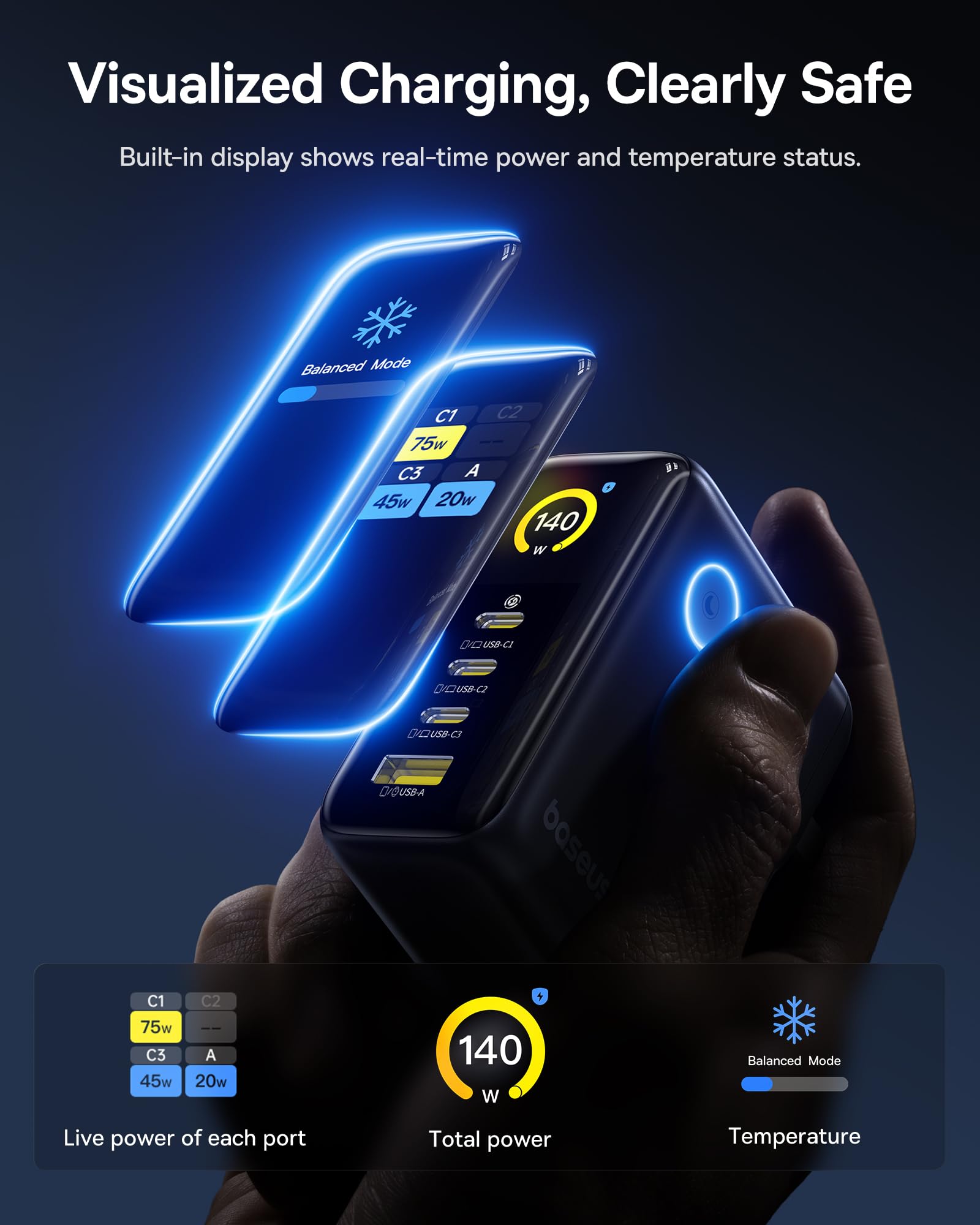
Best four-port 140W
Baseus PicoGo 140W Charger (AH11)
A 140W four-port brick with a smart display, built for a laptop plus three more devices.
Strengths
- USB-C1 and USB-C2 each deliver up to 140W alone, so either port can fast charge a 16 inch laptop
- A third USB-C port reaches 100W, which is rare on a four-port travel brick
- Smart display with touch control shows live output at a glance
- A 240W USB-C cable is included, so the top speed is available immediately
Limitations
- The USB-A port is the slow lane next to three strong USB-C ports
- Four devices at once split the 140W total, so the headline figure is a single-port rating
- The display and touch surface add size compared with the plainest 140W bricks
What owners report
Most praised
- Two 140W ports mean a laptop and a second laptop-class device both charge fast
- The display makes it obvious when a cable or port is underperforming
- Owners like that the included cable is rated for the full 240W standard
Common complaints
- The touch control is easy to brush accidentally in a bag
- Charging four devices at once drops every port well below its headline figure
- Some owners expected the USB-A port to match the USB-C speeds
| Total output | 140W max |
|---|---|
| Ports | 3x USB-C, 1x USB-A |
| USB-C1/C2 output | Up to 140W each alone |
| USB-C3 output | Up to 100W |
| USB-A output | Up to 30W |
| Display | Smart display with touch control |
| Charging tech | GaN6 Pro, PD 3.1, PPS, QC 3.0, BPS 2.0 |
| Size | 75.7 x 59.7 x 36.0 mm |
| Weight | 248 g |
| In the box | Charger, 240W USB-C cable |
Best for: Travellers who charge a laptop, a phone, earbuds and a tablet from a single brick.
Skip if: You want a single-port charger and nothing else; the display and extra ports are paying for features you will not use.
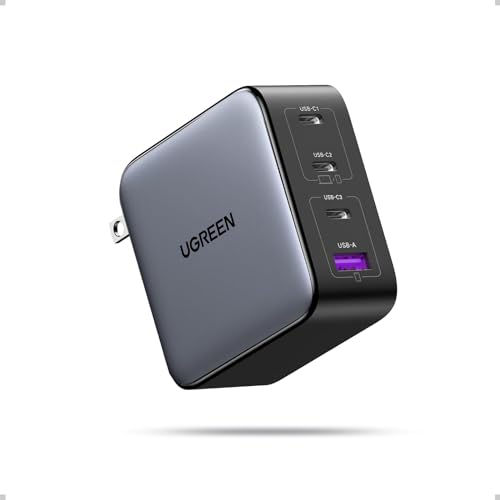
Best budget 100W
UGREEN Nexode 100W GaN Charger (CD226)
Four ports and a full 100W laptop charge at the friendliest price in this guide.
Strengths
- A single USB-C port delivers the full 100W for most ultrabooks and 14 inch laptops
- Four ports in total, three USB-C and one USB-A, charge a whole desk from one outlet
- GaN design with PD 3.0, QC and PPS support keeps the brick small for its output
- Foldable plug makes it a genuine travel brick rather than a desk-only adapter
Limitations
- No cable in the box, and a 100W-rated cable is needed to see the headline speed
- The USB-A port tops out at 22.5W, so it is a phone port, not a tablet fast-charge port
- Four devices at once split the 100W total and the laptop port drops well below its best
What owners report
Most praised
- It replaced a laptop brick and a phone brick with one small cube
- Owners call it the cheapest honest 100W laptop charge they have found
- The foldable plug and square body sit neatly in a tech pouch
Common complaints
- The missing cable catches first-time buyers out at the hotel desk
- Four-device charging is slower than the port count suggests
- Some owners find the USB-A port too slow for a tablet
| Total output | 100W max |
|---|---|
| Ports | 3x USB-C, 1x USB-A |
| Single USB-C | 100W (20V/5A) |
| USB-A output | Up to 22.5W |
| Charging tech | GaN, PD 3.0, QC, PPS |
| Plug | Foldable |
| Size | 2.7 x 2.7 x 1.3 in |
| In the box | Charger only; no cable |
Best for: Budget buyers who want a 100W laptop port plus three more ports for everything else.
Skip if: Your laptop needs 140W to fast charge; this tops out at 100W on its best port.
Best for MacBook Pro 16 inch
Apple 140W USB-C Power Adapter (MLYU3AM/A)
Apple's own 140W adapter: one port, one laptop, the fastest official MacBook charge.

Strengths
- Delivers the full 140W a 16 inch MacBook Pro uses for fast charging
- A single USB-C port under PD 3.1 keeps the power path simple and predictable
- GaN design in Apple's familiar white adapter body with foldable prongs
- Pairs with USB-C to MagSafe 3 for a 16 inch MacBook Pro reaching about half charge in around 30 minutes
Limitations
- One port only, so a phone needs a second outlet or a second charger
- No cable in the box; the USB-C to MagSafe 3 cable is a separate purchase
- It charges Windows laptops too, but the price buys Apple-specific polish, not extra wattage
What owners report
Most praised
- It fast charges a 16 inch MacBook Pro at the speed Apple promises
- Owners trust it as the adapter that will not argue with macOS power management
- The foldable prongs and solid build survive years of daily travel
Common complaints
- A single port feels thin at the price when multi-port bricks cost less
- The missing cable stings on a premium-priced adapter
- Owners who also carry an iPhone end up packing a second charger anyway
| Total output | 140W |
|---|---|
| Ports | 1x USB-C |
| Single USB-C | 140W (PD 3.1) |
| Charging tech | GaN, PD 3.1 |
| Plug | Foldable prongs |
| Size | 5.52 x 4.64 x 1.28 in |
| In the box | Adapter only; cable sold separately |
Best for: MacBook Pro owners who want the exact adapter Apple designed for 140W fast charging.
Skip if: You charge more than one device, or you use a Windows laptop; this has a single port and a single job.
Best for MacBook Pro 14 inch
Apple 96W USB-C Power Adapter (MW2L3AM/A)
The 96W Apple adapter for 14 inch MacBook Pro fast charging, in the classic square body.

Strengths
- Delivers 96W through a single USB-C port, the fast-charge figure for the 14 inch MacBook Pro
- Pairs with USB-C to MagSafe 3 for a 14 inch MacBook Pro reaching about half charge in around 30 minutes
- Single-port USB PD design means no port splitting and no surprises
- Foldable prong and compact square body travel well in a laptop bag
Limitations
- One port only, so every other device needs its own charger
- No cable in the box; the MagSafe 3 cable is a separate purchase
- 96W is a ceiling that 140W laptops and heavier Windows machines will outgrow
What owners report
Most praised
- It fast charges a 14 inch MacBook Pro exactly as Apple describes
- Owners keep it as the spare that lives in the travel bag permanently
- The square body and foldable prong pack without snagging cables
Common complaints
- Buyers notice the cable is missing only after unboxing
- One port at this price feels sparse beside multi-port GaN bricks
- Owners with a 16 inch laptop find it slower than the 140W adapter
| Total output | 96W |
|---|---|
| Ports | 1x USB-C |
| Single USB-C | 96W (USB PD) |
| Plug | Foldable prong |
| Size | 4.88 x 4.88 x 1.22 in |
| In the box | Adapter only; cable sold separately |
Best for: 14 inch MacBook Pro owners who want Apple's own 96W fast-charge adapter.
Skip if: You own a 16 inch MacBook Pro; 96W charges it, but not at the 140W fast-charge speed.
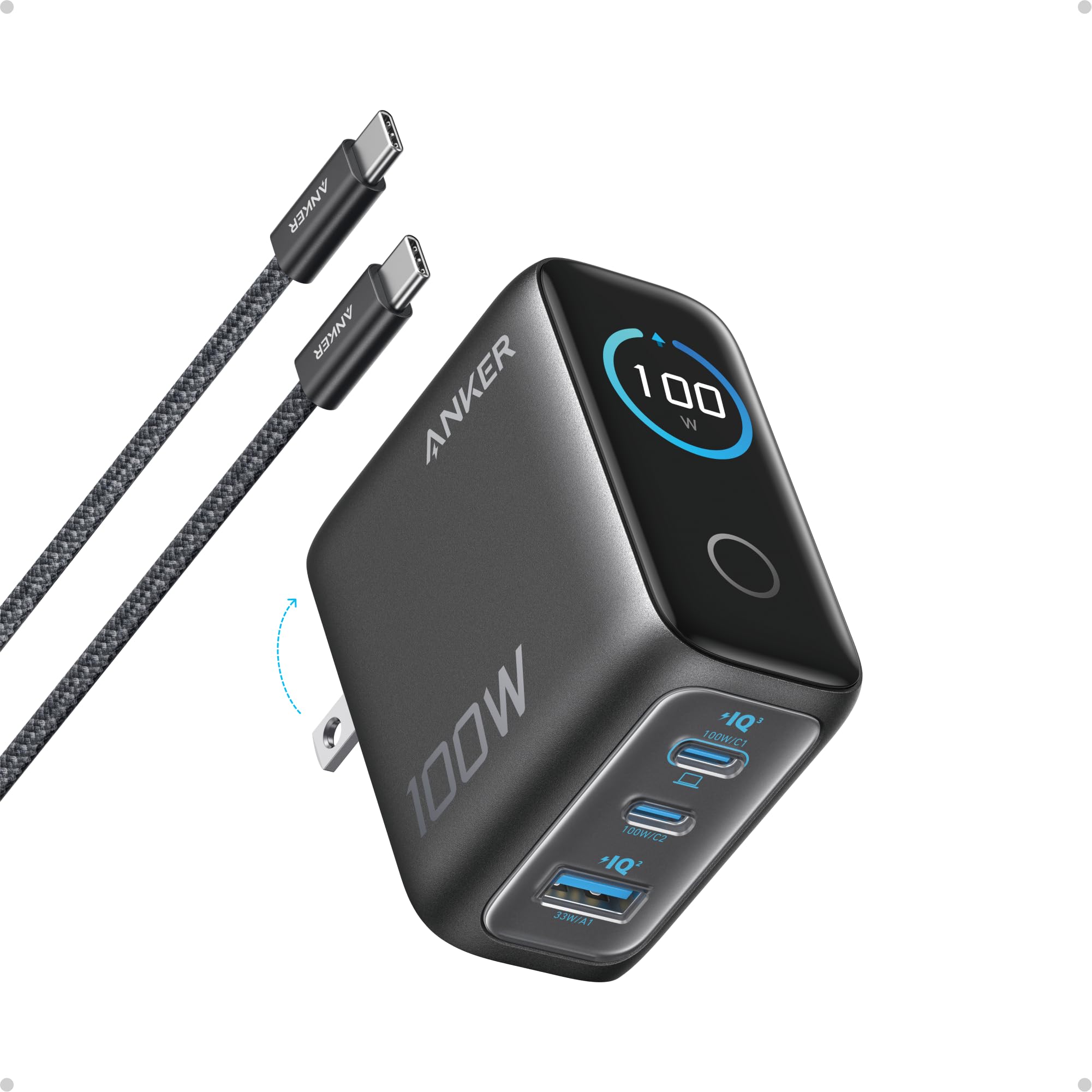
Best smart display charger
Anker 100W Smart Display Charger (B121B)
A 100W GaN brick with a live display that shows exactly what each port is doing.
Strengths
- Both USB-C ports can deliver 100W alone, so either port can be the laptop port
- Smart display with touch control shows live power, voltage, temperature and usage hours
- ActiveShield 4.0 monitors temperature and adjusts output to protect the brick and the device
- A 4.9 ft braided USB-C cable is included, so it works the day it arrives
Limitations
- 100W total means a laptop plus a second device splits the power
- The display is a novelty for buyers who plug in and walk away
- At 7.47 oz it is heavier than the plainest 100W bricks here
What owners report
Most praised
- The live display settles the question of whether the laptop is actually fast charging
- Either USB-C port works as the laptop port, which suits shared hotel outlets
- The included braided cable is praised as a proper cable, not a token one
Common complaints
- Owners who charge two devices at once find the 100W ceiling quickly
- The display stays lit in a dark hotel room unless covered
- Some buyers wanted the display to show per-port wattage side by side
| Total output | 100W max |
|---|---|
| Ports | 2x USB-C, 1x USB-A |
| Single USB-C | 100W (C1 or C2 alone) |
| USB-A output | Up to 33W |
| Display | Smart display with touch control |
| Charging tech | GaN, ActiveShield 4.0, PD 3.0, PPS, QC 3.0 |
| Size | 2.72 x 2.17 x 1.34 in |
| Weight | 7.47 oz |
| In the box | Charger, 4.9 ft USB-C cable |
Best for: Buyers who like to see live wattage, voltage and temperature instead of guessing.
Skip if: You need more than 100W for a 16 inch laptop under load; this tops out at 100W total.
Best budget 140W
AOHI Youth 140W GaN+ Charger (AOC-C017)
A bright yellow 140W GaN+ brick that undercuts the big brands on price.

Strengths
- USB-C1 delivers the full 140W under PD 3.1 with PPS support
- A second USB-C port reaches 100W, so a laptop and a tablet charge fast together
- GaN+ design with AOHICE 3.0 Thermal Guard manages heat at full output
- A three-stage indicator light shows charging status without a display
Limitations
- No cable in the box, so a 140W-rated cable is a separate purchase
- The USB-A port is capped at 22.5W, a phone speed beside the USB-C ports
- At 11 oz it is heavier than the 100W bricks in this guide
What owners report
Most praised
- It fast charges a 16 inch laptop for noticeably less than the big-brand 140W bricks
- The yellow body is easy to spot in a bag, which owners like more than expected
- The indicator light gives a quick read on charging without a screen
Common complaints
- The bright yellow finish is not for everyone, and owners say so
- The missing cable means the first charge needs a cable bought separately
- It runs warm at sustained 140W, like every brick in this class
| Total output | 140W max |
|---|---|
| Ports | 2x USB-C, 1x USB-A |
| USB-C1 output | 140W (28V/5A, PD 3.1, PPS) |
| USB-C2 output | 100W |
| USB-A output | Up to 22.5W |
| Charging tech | GaN+, PD 3.1, QC 4.0+, PPS |
| Plug | Foldable |
| Colour | Yellow |
| Weight | 11 oz |
| In the box | Charger only; no cable |
Best for: Budget buyers who want genuine 140W laptop charging without the premium-brand price.
Skip if: You want a discreet black brick; the yellow Youth design is loud by design.
Best slim 100W
UGREEN Nexode Pro 100W 3-Port Charger (X757)
The slim 100W Nexode Pro: one laptop port, two spare ports, and a 24-month warranty.

Strengths
- USB-C1 delivers the full 100W alone for most ultrabooks and 14 inch laptops
- GaNInfinity and Airpyra design with Thermal Guard keeps the slim body cool
- Supports 45W Samsung Super Fast Charging 2.0 for Galaxy phones
- A 24-month warranty, the longest budget-tier cover in this guide
Limitations
- The second USB-C port reaches only 30W alone, so it cannot serve a second laptop
- Three devices at once split to 65W plus 12.5W plus 12.5W, which slows the laptop
- Cable inclusion was not confirmed on the listing, so budget for a cable
What owners report
Most praised
- It charges a laptop at full speed from a brick barely bigger than a phone charger
- Owners praise the slim shape, which fits a crowded power strip without blocking neighbours
- The 24-month warranty is mentioned as a reason buyers picked it over rivals
Common complaints
- The second USB-C port is too weak for a second laptop, which surprises some buyers
- Three devices at once leaves the laptop crawling
- Buyers are unsure whether a cable should have been in the box
| Total output | 100W |
|---|---|
| Ports | 2x USB-C, 1x USB-A |
| USB-C1 output | 100W alone |
| USB-C2 output | 30W alone |
| USB-A output | Up to 22.5W |
| Two-port split | 65W / 30W |
| Three-port split | 65W / 12.5W / 12.5W |
| Charging tech | GaNInfinity, Airpyra, Thermal Guard, PD, PPS |
| Size | 7.1 x 4.3 x 3.3 cm |
| Weight | 204 g |
Best for: Budget travellers who want a slim 100W laptop charger with a long warranty.
Skip if: Your laptop needs 140W; this is a 100W charger and its second ports are phone speeds.
Best for shared desks
Satechi 165W USB-C 4-Port GaN Charging Station (ST-UC165GM)
A four-port USB-C desk station that charges four laptops and tablets at once.

Strengths
- 165W total across four USB-C ports, with a single port reaching 100W
- Four USB-C ports only, so every port speaks the laptop charging language
- Detachable AC cable and a vertical stand suit a permanent desk position
- Two-year warranty from Satechi, the longest warranty cover in this guide
Limitations
- No USB-A port, so older cables and accessories need an adapter
- No cables in the box, and four devices need four cables of their own
- At 12.1 oz with a separate AC cable it is a desk piece, not a travel brick
What owners report
Most praised
- It cleared four wall warts off a shared desk with one station
- The vertical stand keeps it tidy on a desk edge instead of sprawling
- Owners like that every port is USB-C, with no legacy port wasting space
Common complaints
- The missing USB-A port forces an adapter for older gear
- Four cables are a separate purchase that adds to the real cost
- Travellers find the AC cable and stand awkward to pack
| Total output | 165W |
|---|---|
| Ports | 4x USB-C |
| Single port | Up to 100W |
| Two-port split | 100W / 60W |
| Four-port split | 60W / 45W / 30W / 30W |
| Charging tech | GaN, PD |
| Size | 3.93 x 1.22 x 2.8 in |
| Weight | 12.1 oz |
| In the box | Station, detachable AC cable, stand; no USB cables |
Best for: Desk setups and shared workspaces where four USB-C devices charge from one station.
Skip if: You travel light; this is a desk station with a detachable AC cable and a stand, not a pocket brick.
Best for multi-laptop desks
Anker Prime Charger 250W 6-Port GaNPrime (A2345)
The 250W desktop powerhouse: a 140W laptop port plus five more, with a live LCD.

Strengths
- 250W total, the highest in this guide, across four USB-C and two USB-A ports
- USB-C1 delivers 140W under PD 3.1, with three more USB-C ports at up to 100W each
- A 2.26 inch LCD display with a control dial shows total and per-port output live
- GaNPrime with PowerIQ 4.0 and ActiveShield 3.0 manages heat across six loaded ports
Limitations
- Desktop use only; the weight and the dial make it a poor travel companion
- No cable in the box, and six ports imply six cables to buy
- The Wi-Fi and app features are extras most owners never open after setup
What owners report
Most praised
- It runs two laptops and a stack of smaller devices without breaking a sweat
- The LCD makes the total draw visible, which owners use to balance their ports
- The control dial feels like a proper piece of desk equipment, not a toy
Common complaints
- Owners who bought it for travel admit it never leaves the desk
- Six ports with no cables in the box means a second shopping trip
- The app setup is a chore for a device that works fine without it
| Total output | 250W |
|---|---|
| Ports | 4x USB-C, 2x USB-A |
| USB-C1 output | 140W (PD 3.1) |
| USB-C2-C4 output | Up to 100W each |
| USB-A output | Up to 22.5W each |
| Display | 2.26 in LCD with control dial |
| Charging tech | GaNPrime, PowerIQ 4.0, ActiveShield 3.0 |
| Size | 4.18 x 1.58 x 3.64 in |
| Weight | 22.58 oz |
| In the box | Charging station only; no cable |
Best for: Multi-laptop desks and creators who charge two laptops plus phones and tablets at once.
Skip if: You travel with one laptop; this is a 22.58 oz desktop station, not a travel brick.
How we chose
Single-port wattage is the only number that charges a laptop
A brick labelled 140W may deliver that 140W to one port or split it four ways. The number that decides whether your laptop fast charges is the single-port figure, usually the first USB-C port, and it must match or beat what the laptop asks for: 65W for most ultrabooks, 100W for 14 inch machines, 140W for 16 inch MacBook Pro and heavy Windows laptops. Total wattage matters only for the second and third device. We rank on the single-port figure first and say which port carries it everywhere it appears.
PD version and PPS decide compatibility
USB-C Power Delivery is a negotiation, and the version matters. PD 3.1 with its 28V mode is what unlocks 140W charging; PD 3.0 tops out at 100W. PPS, the programmable power supply mode, is what lets Samsung phones and some laptops fine-tune voltage for faster, cooler charging. A charger that lists PD 3.1 and PPS covers the widest set of laptops and phones, while a charger without them may still charge your machine, just not at its best speed. Check the laptop's own requirement before trusting a headline number.
The cable is half the charger
A 140W charger with a 60W cable is a 60W charger. USB-C cables carry their own wattage rating, and the cheap cable in a drawer is usually the bottleneck, not the brick. Chargers that include a 240W-rated cable, like the UGREEN Nexode 140W and the Anker A2697, work at full speed out of the box. Chargers that ship without one, like the Anker 737 and both Apple adapters, need a cable bought separately, and that cable must be rated for the wattage you expect. Budget for it, and check the rating printed on the cable itself.
Travel size against desk power is a real trade
The smallest bricks here weigh around 200 grams and fold flat into a laptop sleeve. The desk stations weigh over 600 grams, need a separate AC cable, and never leave the desk. Both are honest products, but they answer different questions, and buying a desk station for travel is the most common mistake in this category. Foldable plugs, a single cable instead of a power brick plus a wall wart, and weight under 300 grams are the travel signals. Four or more ports, a display, and a stand are the desk signals. Buy for the bag you actually carry.
Questions, answered
What wattage laptop charger do I need?
Match the charger to the laptop, not to the biggest number on the shelf. Most ultrabooks and 13 inch laptops charge fully on 65W. Fourteen inch laptops and MacBook Pro 14 inch models want 96W to 100W for fast charging. Sixteen inch MacBook Pro and heavy Windows laptops ask for 140W. A charger above the laptop's requirement is safe, since USB-C PD negotiates down, but it buys nothing except headroom for a second device.
Can I use a 140W charger on a laptop that only needs 65W?
Yes. USB-C Power Delivery is a negotiation: the charger offers its capabilities and the laptop draws only what it asks for, so a 140W charger charges a 65W laptop at 65W. The reverse is not true: a 65W charger on a 140W laptop charges slowly, and may not keep up while the laptop is working hard.
Why does my laptop charge slowly on a multi-port charger?
Because total wattage splits. A 100W brick with three devices attached divides its 100W between them, and the laptop port can fall to 65W, 45W or lower depending on the split. For full-speed charging, use the first USB-C port alone, or charge the second device after the laptop. The per-port split figures in each product's specs show exactly how the power divides.
Do I need a special cable for 100W or 140W charging?
Yes, the cable matters as much as the brick. A USB-C cable must be rated for the wattage you expect: 100W cables carry 20V at 5A, and 140W charging needs a 240W-rated cable with an e-marker chip. The cheap cable in a drawer is usually rated 60W or below, and it caps the whole setup. Chargers that include a 240W cable solve this; the rest need one bought separately.
Every guide on Portable Laptop Chargers15 pages
- Topic hubPortable Laptop Chargers
- This ranking is built on one measurement that matters for 16 inch laptops: single-port 140W output under PD 3.1. A brick labelled 140W total is not a 140W laptop charger. Every pick here delivers 140W to one USB-C port, and the ranking separates on what surrounds that port: whether the 240W cable is in the box, how many more ports share the total, and how much the brick costs.The Best 140W Laptop Chargers (2027)
- MacBook charging is a negotiation between the laptop and the charger, and macOS is picky about it. Apple's own adapters are the reference point: 140W for the 16 inch, 96W for the 14 inch. The GaN alternatives here earn their place by matching those speeds on the ports that matter, and the ranking separates on whether the charger also handles the iPhone and iPad beside the MacBook, and whether the MagSafe cable is in the box or bought separately.The Best Portable Laptop Chargers for MacBook (2027)
- A multi-port charger is judged by its split, not its total. A 100W brick that gives the laptop 65W and the phone 30W is a different product from a 100W brick that gives the laptop 100W and the phone nothing. This ranking weights the laptop port's share when other ports are loaded, and the number of genuinely useful ports, and reserves the top spots for bricks whose split figures are published and honest.The Best Multi-Port Laptop Chargers (2027)
- ReviewAnker 737 GaNPrime 120W Charger Review (2027)
- ReviewUGREEN Nexode 140W GaN Charger Review (2027)
- ReviewAnker 140W 4-Port Charger Review (2027)
- ReviewApple 140W USB-C Power Adapter Review (2027)
- ReviewSatechi 165W USB-C 4-Port GaN Charging Station Review (2027)
- ReviewBaseus PicoGo 140W Charger Review (2027)
- Head to headAnker 737 vs UGREEN Nexode 140W (2027)
- Head to headApple 140W vs Anker A2697 (2027)
- Buying guidePortable Laptop Charger Buying Guide (2027)
- Fix itLaptop Charger Not Charging? Fixes (2027)
Related topics in Travel Gear

Travel Gear
The Best Commander Deck Boxes (2027)
Commander deck boxes ranked on sleeve fit, closure strength and table presence.

Travel Gear
The Best Luggage Locks (2027)
Luggage locks ranked on TSA acceptance, cable versus shackle fit, combination digits and key backup.

Travel Gear
The Best Travel Steamers (2027)
Travel steamers ranked on tank size, steam time, wattage and the voltage trap that ruins trips.

Travel Gear
The Best Power Banks (2027)
Power banks ranked on capacity, wattage, ports and pocketability, from 5,000mAh pocket packs to 200W laptop bricks.