Best of
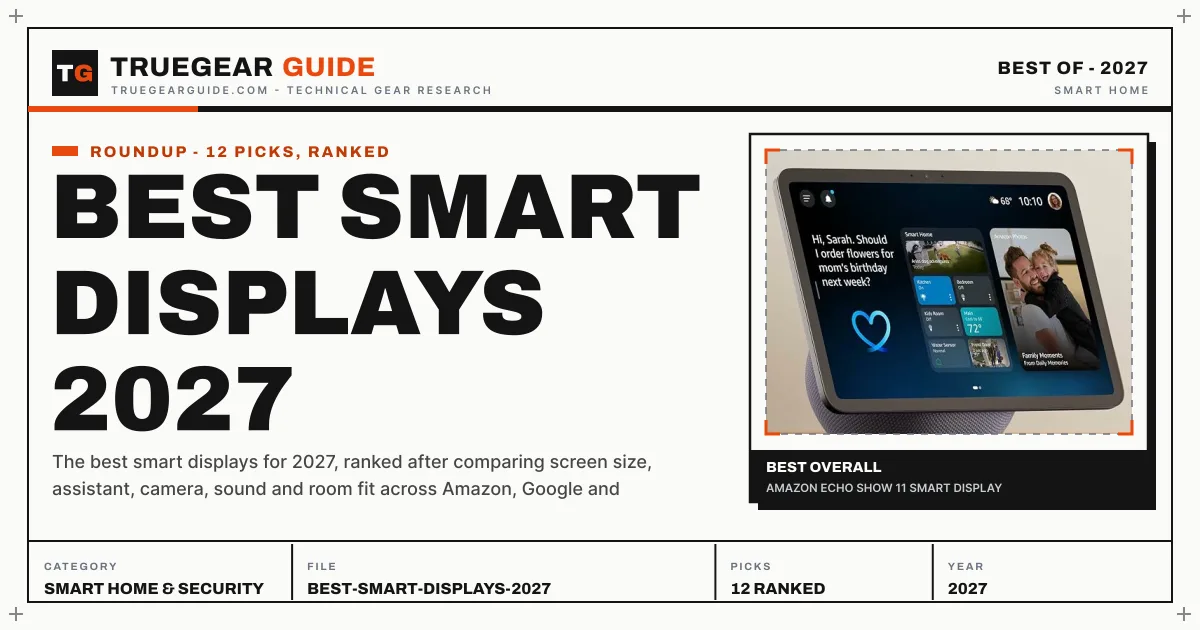
Best Smart Displays 2027
The best smart displays for 2027, ranked after comparing screen size, assistant, camera, sound and room fit across Amazon, Google and Skylight.
The short answer
For most homes in 2027, the Echo Show 11 is the smart display to buy first: an 11 inch Full HD screen, spatial audio, a 13 MP auto-framing camera and a built-in smart home hub, at a size that works on a kitchen counter without swallowing it. Families who want a shared wall board should step up to the Echo Show 15, and Google households should buy the Nest Hub Max instead, because the assistant you already live with matters more than any single spec.
Our top picks at a glance
- Amazon Echo Show 11 Smart DisplayThe 2025 mid-large Show: an 11 inch Full HD screen, spatial audio and the newest Alexa hardware in a countertop size.Best Overall
- Amazon Echo Show 15 (2nd Gen) Smart DisplayThe wall-mount family board: a 15.6 inch Full HD screen with Fire TV, a remote, and widgets for the whole household.Best Family Command Centre
- Amazon Echo Show 21 Smart DisplayThe largest Alexa screen ever sold: a 21 inch Full HD kitchen TV with Fire TV and the same hub brains as the Show 15.Biggest Screen
- Google Nest Hub Max Smart DisplayGoogle's flagship display: a 10 inch screen, a real Nest camera, and the best video calling in the Google home.Best for Google Homes
- Amazon Echo Show 8 (2025) Smart DisplayThe redesigned 8.7 inch Show: bigger viewing area than the 2023 model, newer Alexa hardware, same countertop manners.Best Mid-Size Alexa Display
The picks, ranked
| # | Product | Award | Display | Camera | Audio | Smart home hub | Processor |
|---|---|---|---|---|---|---|---|
| 1 | Amazon Echo Show 11 Smart Display | Best Overall | 11 inch Full HD touchscreen, 1920 x 1200 | 13 MP with auto-framing | Spatial audio | Zigbee, Matter, Thread border router | AZ3 Pro with AI accelerator |
| 2 | Amazon Echo Show 15 (2nd Gen) Smart Display | Best Family Command Centre | 15.6 inch Full HD touchscreen, 1920 x 1080 | 13 MP with shutter, wide field of view | Two 2 inch woofers, two 0.6 inch tweeters | Zigbee, Matter, Thread border router, Sidewalk | - |
| 3 | Amazon Echo Show 21 Smart Display | Biggest Screen | 21 inch Full HD touchscreen, 1920 x 1080 | 13 MP with shutter, auto-framing, 3.3x zoom | Two 2 inch woofers, two 0.6 inch tweeters | Zigbee, Matter, Thread border router, Sidewalk | - |
| 4 | Google Nest Hub Max Smart Display | Best for Google Homes | 10 inch HD touchscreen | 6.5 MP Nest Cam | Stereo speakers, 10 inch speaker base | - | - |
| 5 | Amazon Echo Show 8 (2025) Smart Display | Best Mid-Size Alexa Display | 8.7 inch HD touchscreen | 13 MP with auto-framing | Spatial audio | Built-in hub, Zigbee, Matter, Thread | AZ3 Pro with AI accelerator |
| 6 | Amazon Echo Show 10 (3rd Gen) Smart Display | Best for Moving Around | 10.1 inch HD touchscreen, rotating | 13 MP with motion tracking | Premium sound, cylindrical speaker base | Built-in hub, Zigbee, Sidewalk, Matter | - |
| 7 | Google Pixel Tablet with Charging Speaker Dock | Best Tablet-Display Hybrid | 11 inch tablet display | - | - | - | Google Tensor G2 |
| 8 | Google Nest Hub (2nd Gen) Smart Display | Best Camera-Free Display | 7 inch touchscreen, 1024 x 600 | None | Full-range speaker with strong bass for its size | - | - |
| 9 | Amazon Echo Show 8 (3rd Gen) Smart Display | Best Value Alexa Display | 8 inch HD touchscreen, 1280 x 800 | 13 MP centred auto-framing camera with shutter | Spatial audio | Built-in hub, Zigbee, Matter | - |
| 10 | Amazon Echo Show 5 (3rd Gen) Smart Display | Best Bedside Alexa Display | 5.5 inch touchscreen | 2 MP with built-in shutter | Full-range speaker, deeper bass than prior generation | - | - |
| 11 | Amazon Echo Spot (2024) Smart Display | Best Smart Alarm Clock | 2.83 inch round touchscreen, 320 x 240 | None | Vibrant sound, front-facing speaker | - | - |
| 12 | Skylight Calendar 15 Inch Smart Display | Best Dedicated Family Calendar | 15.4 inch touchscreen | - | - | - | - |
Best Overall
Amazon Echo Show 11 Smart Display
The 2025 mid-large Show: an 11 inch Full HD screen, spatial audio and the newest Alexa hardware in a countertop size.

Strengths
- 11 inch Full HD touchscreen with noticeably more viewing area than the Show 8, so recipes and calendars stop feeling cramped
- Spatial audio tuned for a room rather than a desk, with the 13 MP auto-framing camera keeping video calls centred
- Built-in smart home hub with Zigbee, Matter and Thread, so compatible lights, plugs and locks pair without a separate hub
- The AZ3 Pro chip and Omnisense presence features, built for the newer Alexa experience rather than retrofitted to it
Limitations
- It needs counter space and a power outlet in view; it is not a wall-mount-first design like the Show 15
- The adjustable stand is a separate purchase, so the out-of-box viewing angle is whatever your counter gives it
- Alexa households get the full experience; Google-first homes will find its photo and video services less native
What owners report
Most praised
- The screen size lands in a sweet spot where recipes stay readable from the stove without dominating the counter
- Video calls stay framed on the person moving around the kitchen instead of drifting off to the side
- Setting up lights and plugs directly on the display, with no extra hub box, surprises first-time smart home buyers
Common complaints
- The fixed viewing angle frustrates buyers who expected to tilt it toward the dining table
- Owners who wanted it wall-mounted find the countertop footprint larger than the photos suggested
- Some households report the presence features switching views when someone merely walks past
| Display | 11 inch Full HD touchscreen, 1920 x 1200 |
|---|---|
| Camera | 13 MP with auto-framing |
| Audio | Spatial audio |
| Smart home hub | Zigbee, Matter, Thread border router |
| Processor | AZ3 Pro with AI accelerator |
| Assistant | Alexa, designed for Alexa+ |
Best for: Kitchens and living rooms where one screen must handle recipes, video, calendars and smart home control without taking over the wall.
Skip if: You want a wall-mounted family board or the cheapest Alexa screen; the Show 15 and the Show 5 serve those two jobs better.
Best Family Command Centre
Amazon Echo Show 15 (2nd Gen) Smart Display
The wall-mount family board: a 15.6 inch Full HD screen with Fire TV, a remote, and widgets for the whole household.

Strengths
- 15.6 inch Full HD display that reads from across the kitchen, with widgets for calendar, lists, weather and cameras in one glance
- Fire TV built in with a voice remote included, so it replaces a small kitchen television rather than sitting next to one
- Wall mount, anchors and template included in the box, with portrait or landscape orientation
- Full smart home hub credentials: Zigbee, Matter, Thread border router and Sidewalk, plus a 13 MP camera with wide field of view
Limitations
- Countertop use needs the separately sold stand, which changes the total cost and the footprint
- At 15.6 inches it dominates a small kitchen and looks oversized in a bedroom or hallway
- The Fire TV remote cannot control widgets or Alexa skills, so households juggle two control styles on one screen
What owners report
Most praised
- The shared calendar widgets end the daily question of who is doing school pickup, because the answer sits on the wall
- Fire TV turns dead kitchen time into proper television without adding another screen to the room
- The wall mount hardware in the box makes installation a single-afternoon job for confident DIY households
Common complaints
- Buyers who skipped the stand discover too late that countertop placement was not the default plan
- The panel washes out in bright kitchens when mounted opposite a window
- Remote control limits annoy households that expected one remote to run the whole screen
| Display | 15.6 inch Full HD touchscreen, 1920 x 1080 |
|---|---|
| Camera | 13 MP with shutter, wide field of view |
| Audio | Two 2 inch woofers, two 0.6 inch tweeters |
| Smart home hub | Zigbee, Matter, Thread border router, Sidewalk |
| Size and weight | 16.1 x 10.1 x 1.4 in, 4.96 lb |
| In the box | Voice remote, wall mount, anchors, template |
Best for: Families who want one shared screen in the kitchen for calendars, shopping lists, cameras and television.
Skip if: You rent and cannot wall-mount, or you want a small countertop screen; the stand is sold separately and the panel is big.
Biggest Screen
Amazon Echo Show 21 Smart Display
The largest Alexa screen ever sold: a 21 inch Full HD kitchen TV with Fire TV and the same hub brains as the Show 15.

Strengths
- 21 inch Full HD screen, nearly double the viewing area of the Show 15, readable from across an open-plan room
- Fire TV built in with the voice remote included, so it doubles as the room's small television for news and streaming
- The same 13 MP auto-framing camera and hub set as the Show 15, with Wi-Fi 6E and a wall mount in the box
- Widgets scale to the panel, so a family calendar, shopping list and camera feeds share one screen without crowding
Limitations
- At 10.7 lb and over 21 inches wide it needs a serious wall and a stud, not a picture hook
- The countertop stand is a separate purchase, and at this size the stand footprint is substantial
- Resolution stays Full HD, so close-up viewing shows the pixels a smaller panel would hide
What owners report
Most praised
- From the far counter the calendar and recipe text stay readable in a way no smaller Show manages
- Replacing a small kitchen television with one panel that also runs the smart home wins over sceptical partners
- Video calls on the big panel feel closer to talking through a window than through a phone
Common complaints
- Wall mounting turns into a proper DIY project, with stud-finding and cable routing nobody budgeted for
- Owners with the panel near the dining table say the screen dominates conversation at mealtimes
- Close-up viewers notice the Full HD softness that disappears at proper across-the-room distance
| Display | 21 inch Full HD touchscreen, 1920 x 1080 |
|---|---|
| Camera | 13 MP with shutter, auto-framing, 3.3x zoom |
| Audio | Two 2 inch woofers, two 0.6 inch tweeters |
| Smart home hub | Zigbee, Matter, Thread border router, Sidewalk |
| Size and weight | 21.4 x 13.2 x 1.5 in, 10.7 lb |
| In the box | Voice remote, wall mount, anchors, template |
Best for: Large kitchens and open-plan living spaces where the display must be legible from the far side of the room.
Skip if: Your kitchen is small, your wall space is tight, or a television already hangs in the room; this is a second TV, not a gadget.
Best for Google Homes
Google Nest Hub Max Smart Display
Google's flagship display: a 10 inch screen, a real Nest camera, and the best video calling in the Google home.

Strengths
- 10 inch HD touchscreen with a 6.5 MP Nest camera that supports video calls and home monitoring from the same lens
- Stereo speakers tuned for music and YouTube, with a fabric base that suits a living room better than a plastic slab
- Google Photos ambient display turns the screen into a living photo frame between tasks
- Camera-based gestures and Face Match personalisation, so different household members get their own calendars and answers
Limitations
- The camera cannot be physically shuttered the way Echo cameras can, which matters in bedrooms
- No Fire TV and no native Ring or Blink camera viewing, so Alexa camera households lose their feeds
- Google's display software has shifted over the years, and some owners feel features arrived and left without warning
What owners report
Most praised
- Video calls to grandparents land better than on a phone, because the camera frames the room instead of one face
- The photo frame mode quietly becomes the reason the display stays on the counter, long after the novelty fades
- YouTube recipes play hands-free while cooking, with voice control that actually pauses at the right step
Common complaints
- The always-present camera makes some households move it out of bedrooms and bathrooms entirely
- Owners miss features that quietly changed or disappeared in software updates over the years
- Alexa camera owners find their doorbell and security feeds simply do not appear here
| Display | 10 inch HD touchscreen |
|---|---|
| Camera | 6.5 MP Nest Cam |
| Audio | Stereo speakers, 10 inch speaker base |
| Assistant | Google Assistant |
| Photo display | Google Photos ambient mode |
| Smart home | Google Home controls, Nest camera monitoring |
Best for: Google households who video call family, watch YouTube in the kitchen, and want a camera that doubles as a security eye.
Skip if: You want an Alexa home, a camera-free bedroom screen, or a display that also runs Fire TV; this is none of those.
Best Mid-Size Alexa Display
Amazon Echo Show 8 (2025) Smart Display
The redesigned 8.7 inch Show: bigger viewing area than the 2023 model, newer Alexa hardware, same countertop manners.

Strengths
- 8.7 inch HD touchscreen with more viewing area than the 2023 Show 8, so video and recipes breathe a little
- Spatial audio and a 13 MP camera with auto-framing, in the same fabric-base shape that suits a countertop
- Built-in smart home hub with the AZ3 Pro chip, matching the Show 11's newer Alexa hardware
- A genuinely middle size: large enough for video, small enough for a nightstand-adjacent desk or a crowded counter
Limitations
- It is not a dramatic leap over the 2023 Show 8 for owners who already have that model working
- The adjustable stand remains a separate purchase, as with its bigger 2025 sibling
- Screen resolution stays HD-class, so it will not match the Show 11's Full HD crispness side by side
What owners report
Most praised
- The slightly larger screen over the older Show 8 makes video calls feel less like peering through a letterbox
- Sound fills a kitchen properly now, where the older small Shows stayed desk-sized in volume
- Its footprint slips onto counters that rejected the Show 11 as too wide
Common complaints
- Upgraders from the 2023 model say the day-to-day difference is smaller than the new-model badge implies
- The tilt stand upsell annoys buyers who assumed angling the screen was included
- Text on the HD panel looks soft next to a Full HD phone held at the same distance
| Display | 8.7 inch HD touchscreen |
|---|---|
| Camera | 13 MP with auto-framing |
| Audio | Spatial audio |
| Smart home hub | Built-in hub, Zigbee, Matter, Thread |
| Processor | AZ3 Pro with AI accelerator |
| Assistant | Alexa, designed for Alexa+ |
Best for: Kitchens and desks where the Show 11 feels large and the Show 5 feels small.
Skip if: You want the lowest-priced Alexa display or a wall board; the 2023 Show 8 and the Show 15 cover those ends.
Best for Moving Around
Amazon Echo Show 10 (3rd Gen) Smart Display
The rotating Show: a 10.1 inch screen on a motorised base that turns to face you as you move around the room.

Strengths
- Motorised base rotates the 10.1 inch HD screen to follow the viewer, so recipes and calls stay in sight while you move
- Premium sound from the cylindrical speaker base, the strongest audio in the countertop Show range at its launch
- 13 MP camera with motion tracking, so video calls keep the speaker framed without manual adjustment
- Built-in smart home hub, so it anchors an Alexa household as well as entertaining it
Limitations
- Rotation needs clearance on all sides, which rules out tight corners and crowded counters
- The moving base adds a mechanical part that fixed displays simply do not have to maintain
- It predates the 2025 Show hardware, so its Alexa experience is older than the Show 8 and Show 11 of 2025
What owners report
Most praised
- Cooking with a recipe on screen finally works, because the display turns as the cook moves between sink and stove
- Video calls feel natural when the camera follows the speaker instead of freezing on an empty chair
- The speaker base sounds closer to a real music speaker than to a smart display afterthought
Common complaints
- Owners with tight counters find the rotation blocked by walls, jars and knife blocks
- The motor hum draws attention in quiet rooms during slow turns
- Some households switch rotation off after a week and then wonder why they paid for it
| Display | 10.1 inch HD touchscreen, rotating |
|---|---|
| Camera | 13 MP with motion tracking |
| Audio | Premium sound, cylindrical speaker base |
| Smart home hub | Built-in hub, Zigbee, Sidewalk, Matter |
| Size | 9.9 x 9.0 x 6.7 in |
| Weight | 90.3 oz |
Best for: Kitchens and living rooms where you move while you watch, cook, or take a video call.
Skip if: The display will sit in a tight corner, face a wall, or live somewhere rotation would knock into things.
Best Tablet-Display Hybrid
Google Pixel Tablet with Charging Speaker Dock
The two-in-one: an 11 inch Android tablet that docks into a speaker and becomes a smart display with Hub Mode.

Strengths
- 11 inch tablet with the Tensor G2 chip, so it runs apps, video and browsing as a proper tablet, not a display-only panel
- Magnetic charging speaker dock keeps it charged around the clock and turns it into a room-filling speaker
- Hub Mode on the dock gives smart home controls, photo frame and hands-free help, like a Nest Hub with a detachable brain
- The tablet lifts off the dock for portable use, then drops back on to recharge and resume display duty
Limitations
- As a display it only works while docked, and the dock takes counter space even when the tablet is elsewhere
- Tablet software means more setup, updates and app choices than a single-purpose display ever asks for
- Buying the bundle costs more than a dedicated display, and the tablet alone without the dock loses the display trick
What owners report
Most praised
- One purchase covering both a kitchen display and a travel tablet feels like the rare gadget bargain that holds up
- Dropping the tablet onto the dock at night and waking to a charged photo frame becomes a household habit fast
- The dock speaker sounds far better than buyers expected from what looks like a charging stand
Common complaints
- Family members keep undocking the tablet, leaving the counter without its display at dinner time
- The dock footprint plus cable eats more counter than a fixed display of the same screen size
- Tablet notifications and app prompts interrupt the calm display role more than a dedicated hub would
| Display | 11 inch tablet display |
|---|---|
| Processor | Google Tensor G2 |
| Dock | Charging speaker dock, magnetic |
| Display mode | Hub Mode with smart home controls |
| Storage | 256 GB in this bundle |
| Assistant | Google Assistant |
Best for: Households that want a real tablet for the sofa and a smart display on the counter, without buying both.
Skip if: You want a display that never leaves its spot, or you live entirely in Alexa; a docked tablet is a compromise on both sides.
Best Camera-Free Display
Google Nest Hub (2nd Gen) Smart Display
The camera-free Google display: a 7 inch screen with sleep sensing, for bedrooms and small counters.

Strengths
- No camera anywhere on the device, which removes the bedroom privacy argument in one stroke
- Soli radar sleep sensing tracks sleep patterns from the nightstand without anything worn or attached
- 7 inch touchscreen with an ambient light sensor, so the photo frame display never glares at night
- Compact fabric-base shape that fits a nightstand without crowding out the lamp and the book
Limitations
- No video calling, since there is no camera to call with
- The 7 inch screen is small for recipes and video, and it shows it in a kitchen
- Sleep sensing needs the display near the bed and a still room, which not every bedroom layout allows
What owners report
Most praised
- The missing camera is the selling point for bedrooms, and owners mention it first in almost every conversation
- Sleep reports become a morning ritual for couples tracking rest without wearables
- The screen dims so gently at night that it replaces a clock without becoming a second lamp
Common complaints
- Buyers who assumed all smart displays do video calls discover the omission only after unboxing
- Sleep sensing misreads restless partners and pets as the owner's own sleep
- Kitchen buyers find the small screen a poor recipe reader compared with the 10 inch options
| Display | 7 inch touchscreen, 1024 x 600 |
|---|---|
| Camera | None |
| Sleep sensing | Soli radar |
| Assistant | Google Assistant |
| Audio | Full-range speaker with strong bass for its size |
| Display feature | Ambient EQ light sensor, photo frame mode |
Best for: Bedrooms, where a camera is unwelcome but a sunrise alarm, sleep tracking and a small screen are wanted.
Skip if: You need video calls or a camera for monitoring; this display deliberately has no camera at all.
Best Value Alexa Display
Amazon Echo Show 8 (3rd Gen) Smart Display
The value Show: the 2023 8 inch model with spatial audio and a hub, usually the cheapest way into a proper Alexa screen.

Strengths
- 8 inch HD touchscreen with a centred 13 MP auto-framing camera, so video calls stay natural at desk distance
- Spatial audio that outperforms the Show 5 by a wide margin for music and video in a room
- Built-in smart home hub, so it still anchors an Alexa home without extra hardware
- Often the best value in the range when the newer models hold their launch pricing
Limitations
- Older processor and older Alexa generation than the 2025 Shows, so newer features arrive later or not at all
- The HD panel and chunky bezels look dated next to the 2025 redesign
- No Fire TV and no wall-mount-first design, so it stays a countertop screen
What owners report
Most praised
- For the money it delivers the whole Alexa display trick, video calls and all, without feeling like a compromise
- The centred camera frames faces better than the off-centre lenses on older small displays
- Music in a bedroom or office sounds full enough that owners stop reaching for a separate speaker
Common complaints
- Owners comparing it with the 2025 model notice the slower responses and older interface straight away
- The bezels and weight make it look like yesterday's hardware on a modern counter
- Some buyers expected Fire TV after seeing it on the larger Shows and found it absent here
| Display | 8 inch HD touchscreen, 1280 x 800 |
|---|---|
| Camera | 13 MP centred auto-framing camera with shutter |
| Audio | Spatial audio |
| Smart home hub | Built-in hub, Zigbee, Matter |
| Assistant | Alexa |
Best for: Buyers who want the full Alexa display experience and are happy with last generation's hardware to save money.
Skip if: You want the newest Alexa hardware or the larger 2025 screen; the 2025 Show 8 and Show 11 are the newer buys.
Best Bedside Alexa Display
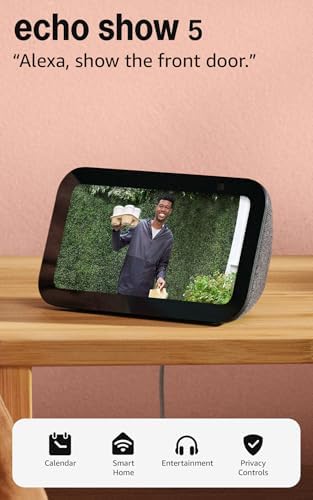
Amazon Echo Show 5 (3rd Gen) Smart Display
The bedside Show: a 5.5 inch screen with a camera shutter, deeper bass, and a footprint smaller than a paperback.
Strengths
- 5.5 inch touchscreen that fits a nightstand without pushing the lamp off the edge
- 2 MP camera with a built-in shutter, plus a mic off button, for bedrooms that want privacy controls
- Deeper bass and clearer sound than the previous Show 5, so alarms and morning news do not sound thin
- The cheapest entry to Alexa with a screen, and a natural second display for existing Alexa homes
Limitations
- The small screen makes video, recipes and photo slideshows cramped rather than enjoyable
- Camera quality is basic, so video calls look soft compared with the 13 MP Shows
- Retailer notes flag no Netflix compatibility on this model, which surprises streamers
What owners report
Most praised
- As a smart alarm clock it earns its place, with sunrise routines and weather before feet hit the floor
- The camera shutter gets used daily by privacy-minded owners who close it at night without thinking
- Its size lets it live on desks and nightstands where every larger Show was vetoed
Common complaints
- Video on the small panel disappoints buyers who expected a mini television
- The camera looks muddy on calls next to the 13 MP models in the same house
- Owners who bought it for streaming find the app gaps only after setup
| Display | 5.5 inch touchscreen |
|---|---|
| Camera | 2 MP with built-in shutter |
| Audio | Full-range speaker, deeper bass than prior generation |
| Assistant | Alexa |
| Smart home | Alexa smart home controls |
Best for: Nightstands and desks where the display is an alarm clock first and a smart screen second.
Skip if: You want to watch video or read recipes; at 5.5 inches both are exercises in squinting.
Best Smart Alarm Clock
Amazon Echo Spot (2024) Smart Display
The alarm clock display: a round 2.83 inch screen, no camera at all, and vibrant sound for the nightstand.

Strengths
- Round 2.83 inch display shaped like a clock, with large customisable clock faces that read at a glance
- No camera, which settles the bedroom privacy question before it starts
- Vibrant sound from a compact sphere, with a front-facing speaker that suits alarms, music and news
- eero built in, which extends an existing eero Wi-Fi network from the nightstand
Limitations
- The tiny screen cannot show video, photos or recipes in any useful size
- No camera means no video calls and no drop-in with a face
- The eero benefit only applies to households already running eero routers
What owners report
Most praised
- The clock faces at night are the feature owners keep mentioning, bright enough to read, dim enough to sleep beside
- No camera means it passes the bedroom test that every other Echo display has to argue its way through
- Alarms with music and sunrise routines make waking up noticeably less abrupt than a phone alarm
Common complaints
- Buyers expecting a small Show discover the screen is clock-sized and nothing more
- The round shape looks odd to owners who wanted a conventional rectangular display
- Without a camera, video calls and visual drop-in simply do not exist on this device
| Display | 2.83 inch round touchscreen, 320 x 240 |
|---|---|
| Camera | None |
| Audio | Vibrant sound, front-facing speaker |
| Assistant | Alexa |
| Connectivity | eero built in, extends existing eero networks |
Best for: Bedrooms where the display must be a clock and alarm first, with Alexa on call and no camera in the room.
Skip if: You want video, photos, or a screen you can read from across the room; this screen is for glances, not viewing.
Best Dedicated Family Calendar
Skylight Calendar 15 Inch Smart Display
The non-Alexa, non-Google pick: a dedicated 15.4 inch family calendar and chore chart that does one job brilliantly.

Strengths
- 15.4 inch touchscreen wall planner with colour-coded calendars per family member, visible from the hallway
- Chore chart built in, so children's tasks sit next to the family schedule instead of on a separate app
- Wall mount included in the box, so it hangs like a picture frame rather than occupying counter space
- No voice assistant and no camera use, which suits households that want a screen without a listening device
Limitations
- It cannot answer questions, play music, or control the smart home; it is a calendar, not a hub
- Setup means entering the family's schedules into yet another system before it pays off
- The wall-mount-only design needs a free wall and a nearby outlet, which some kitchens lack
What owners report
Most praised
- The wall calendar ends the nightly schedule negotiation, because everyone can see the week at breakfast
- Children checking their own chores off the screen becomes a routine parents did not have to police
- Guests and grandparents read the family plan at a glance without needing anyone's phone
Common complaints
- Households expecting Alexa or Google features feel misled by the smart display label
- The first week of setup, typing in every recurring event, tests the patience of busy families
- Kitchens without a free wall near an outlet struggle to find it a home
| Display | 15.4 inch touchscreen |
|---|---|
| Calendar | Colour-coded family calendar, shared schedules |
| Chores | Built-in chore chart |
| Mounting | Wall mount included |
| Assistant | None |
Best for: Families drowning in schedules who want a shared calendar on the wall, without a voice assistant listening in.
Skip if: You want a voice assistant, video streaming, or smart home control; this display does calendars, chores and lists, full stop.
How we chose
Room fit first
A display earns its place by fitting the room: bedside clocks stay small and camera-free, kitchen counters take 8 to 11 inches, and walls take 15 inches and up. Size drove the ranking more than any feature list.
Assistant loyalty
Alexa displays serve Alexa homes and Google displays serve Google homes. Crossing ecosystems costs you camera feeds, photo services and native smart home control, so ecosystem match outranked raw specs.
Camera on purpose
A camera is a feature in the kitchen and a liability in the bedroom. We rewarded displays that let you shutter, cover or entirely skip the camera, and we flagged the ones that cannot.
Sound that fills a room
A display that only works at desk distance fails at its main job. We favoured speaker systems that carry across a kitchen, and we marked the clock-sized models that do not try.
Questions, answered
Which smart display should I buy first in 2027?
Buy the Echo Show 11 if you use Alexa, and the Nest Hub Max if you use Google. Both sit in the size range that works in most kitchens, both have cameras good enough for real video calls, and both anchor a smart home. Only step up to the Show 15 or Show 21 if you specifically want a wall board, and only step down to a Show 5 or Echo Spot if the display is for a nightstand.
Do I need a camera on my smart display?
Only if you video call from that room or want the display to double as a security camera. Kitchens benefit from a camera; bedrooms usually do not. If the display is for a bedroom, choose a camera-free model like the Nest Hub (2nd Gen) or the Echo Spot, or a model with a physical shutter you will actually close.
Alexa or Google: does it matter which assistant my display uses?
Yes, more than the screen size. Alexa displays show Ring and Blink cameras natively and run Fire TV; Google displays run YouTube and Google Photos natively and call other Google users best. Match the display to the assistant your household already uses for lights, cameras and photos, and you avoid the most common regret in this category.
Can a smart display replace a kitchen television?
The Show 15 and Show 21 can, because Fire TV is built in and a remote is included. The smaller Shows and the Google displays stream video, but they are not televisions: they lack remotes, tuners and the screen size for across-the-room viewing. If television is the job, buy the wall size, not the countertop size.
Every guide on Smart Displays15 pages
- Topic hubSmart Displays
- kitchenBest Smart Displays for Kitchens 2027
- bedroomBest Smart Displays for Bedrooms 2027
- family organizationBest Smart Displays for Family Organization 2027
- ReviewEcho Show 11 Review 2027
- ReviewEcho Show 15 Review 2027
- ReviewEcho Show 21 Review 2027
- ReviewGoogle Nest Hub Max Review 2027
- ReviewEcho Show 8 (2025) Review 2027
- ReviewEcho Show 10 Review 2027
- Head to headEcho Show 11 vs Nest Hub Max 2027
- Head to headEcho Show 15 vs Echo Show 21 2027
- Buying guideSmart Display Buying Guide 2027
- Fix itSmart Display Not Responding: Fixes 2027
Related topics in Smart Home & Security
Smart Home & Security
The Best Smart Thermostats (2027)
Comfort on schedule and energy bills that finally make sense.
Smart Home & Security
The Best Smart Smoke & CO Detectors (2027)
Connected smoke and carbon monoxide alarms ranked on sensing, interconnect, and alert reliability.
Smart Home & Security
The Best Smart Plugs (2027)
Outlet control ranked on load rating, energy monitoring, and Matter readiness.
Smart Home & Security
The Best Smart Locks (2027)
Keyless entry that is actually more secure than the key it replaces.