Budget here means value per scan, not the cheapest scanner in the drawer. A scanner that costs very little and cannot scan your film, or that scans so slowly you never finish the box, is not a bargain. This ranking weights honest performance on everyday prints above everything else, and it rewards scanners that do one job well over scanners that promise everything. The premium entries appear because they are the stretch worth making when the job is film or a thousand prints, not because a first-time buyer should buy them for one album.
The Best Budget Photo Scanners (2027)
Budget photo scanners for 2027: the best value flatbeds and feeders for prints and film, plus the premium picks worth stretching for.
The short answer
For occasional prints on a tight budget, the Canon CanoScan LiDE 300 is the honest budget pick: a slim 2400 dpi flatbed with one-touch buttons. Step up to the LiDE 400 for 4800 dpi, or to the Epson Perfection V39 II for a high-rise lid that handles books. If film is in the box, stretch to the Epson Perfection V600, because no budget scanner here scans negatives.
Our top picks at a glance
- Canon CanoScan LiDE 300 Slim ScannerThe cheapest way into Canon's slim flatbed line, with 2400 dpi for everyday photos.Best budget overall
- Canon CanoScan LiDE 400 Slim ScannerA slim USB-powered flatbed that delivers 4800 dpi scans from a body barely thicker than a notebook.Best budget upgrade
- Epson Perfection V39 II Photo ScannerA budget flatbed that scans photos well and runs entirely off a USB cable.Best budget for books
- Plustek ePhoto Z300 Photo ScannerA compact photo feeder that turns a stack of prints into files in about two seconds per photo.Best budget feeder
- Epson Perfection V550 Photo ScannerA mid-priced flatbed that covers prints and film with the same 6400 dpi sensor as its bigger siblings.Best value flatbed
- Kodak Slide N Scan Film and Slide ScannerA standalone film digitizer with a big screen that needs no computer at all.Best budget film digitizer
- Brother DSmobile DS-940DW Mobile ScannerA battery-powered pocket scanner for two-sided documents and photos on the move.Best budget portable
- Epson Perfection V600 Photo ScannerThe classic flatbed for prints and film, with the resolution and dust removal that made it the default home photo scanner.Best stretch pick
- Canon imageFORMULA R40 Office ScannerA compact office document scanner with a 60-sheet feeder and one-touch job buttons.Best budget office scanner
- Fujitsu ScanSnap iX1600 Wireless ScannerA fast wireless document scanner with a touchscreen that also handles photos and receipts.Best premium value
The picks, ranked
Every product in this lineup was picked for this use case, ranked with our strongest choices first. If a product from the wider category does not genuinely fit this scenario, it is not listed here.
| # | Product | Award | Resolution | Type | Speed | Buttons | Model |
|---|---|---|---|---|---|---|---|
| 1 | Canon CanoScan LiDE 300 Slim Scanner | Best budget overall | 2400 dpi optical resolution | Slim flatbed scanner | A4 300 dpi scan in about 10 seconds | Four one-touch buttons for PDF, Auto Scan, Copy, Send | Model number 2995C002 |
| 2 | Canon CanoScan LiDE 400 Slim Scanner | Best budget upgrade | 4800 dpi optical resolution | - | - | Four one-touch buttons for PDF, Auto Scan, Copy, Send | Model number 2996C002 |
| 3 | Epson Perfection V39 II Photo Scanner | Best budget for books | 4800 dpi optical resolution | Slim flatbed for photos and documents | - | One-touch buttons for PDF, email and copy | - |
| 4 | Plustek ePhoto Z300 Photo Scanner | Best budget feeder | 600 dpi optical resolution | - | 2 seconds per 4x6 photo | - | - |
| 5 | Epson Perfection V550 Photo Scanner | Best value flatbed | 6400 dpi optical resolution | Flatbed photo scanner | - | - | - |
| 6 | Kodak Slide N Scan Film and Slide Scanner | Best budget film digitizer | - | - | - | - | Model RODFS50 |
| 7 | Brother DSmobile DS-940DW Mobile Scanner | Best budget portable | 600 dpi optical resolution | - | 16 ppm duplex scanning | - | - |
| 8 | Epson Perfection V600 Photo Scanner | Best stretch pick | 6400 dpi optical resolution | Flatbed photo scanner | - | Four one-touch buttons for PDF, email, copy, scan | - |
| 9 | Canon imageFORMULA R40 Office Scanner | Best budget office scanner | 600 dpi optical resolution | - | 40 ppm black and white | - | - |
| 10 | Fujitsu ScanSnap iX1600 Wireless Scanner | Best premium value | 600 dpi optical resolution | - | 40 ppm duplex scanning | - | - |
Best budget overall
Canon CanoScan LiDE 300 Slim Scanner
The cheapest way into Canon's slim flatbed line, with 2400 dpi for everyday photos.

Strengths
- 2400 dpi is plenty for prints shared online
- A4 scans finish in about 10 seconds at 300 dpi
- Four one-touch buttons for PDF, Auto Scan, Copy and Send
- 48-bit color depth keeps tones smooth
Limitations
- No film or slide support
- 2400 dpi is low for enlarging small prints
- No feeder for batches
- Windows-only compatibility in some listings
What owners report
Most praised
- The price is hard to beat for a working flatbed
- Scans of everyday prints look clean and bright
- The slim body tucks away easily
Common complaints
- Enlarging a small print shows the resolution limit
- Film scanning is not possible on this model
- Mac users face limited support in some listings
| Resolution | 2400 dpi optical resolution |
|---|---|
| Type | Slim flatbed scanner |
| Speed | A4 300 dpi scan in about 10 seconds |
| Buttons | Four one-touch buttons for PDF, Auto Scan, Copy, Send |
| Model | Model number 2995C002 |
| Color depth | 48-bit color depth, 16-bit grayscale |
Best for: Light photo and document scanning where budget matters most.
Skip if: You need high resolution or film scanning, since 2400 dpi and no film unit set the ceiling.
Best budget upgrade
Canon CanoScan LiDE 400 Slim Scanner
A slim USB-powered flatbed that delivers 4800 dpi scans from a body barely thicker than a notebook.

Strengths
- 4800 dpi resolution for sharp photo scans
- Slim 0.4-inch body slides into a shelf or drawer
- Four one-touch buttons cover PDF, Auto Scan, Copy and Send
- Handles photos and documents in one slim unit
Limitations
- No film or transparency scanning
- No feeder, so batches are one page at a time
- The lid has no hinge rise for thick books
- Color depth is fine for prints but not for pro film work
What owners report
Most praised
- The slim body disappears on a small desk
- Photo scans look sharp and clean
- The buttons make a quick PDF scan a one-press job
Common complaints
- Thick books do not sit flat under the low lid
- There is no way to scan negatives or slides
- Scanning a stack of photos takes a while one by one
| Resolution | 4800 dpi optical resolution |
|---|---|
| Body | Slim body, 0.4 inches thick |
| Buttons | Four one-touch buttons for PDF, Auto Scan, Copy, Send |
| Media | Photos and documents |
| Model | Model number 2996C002 |
| First sold | First available August 7, 2018 |
Best for: Small desks and occasional photo and document scanning where space matters.
Skip if: You scan film or slides, since there is no transparency unit or film holder.
Best budget for books
Epson Perfection V39 II Photo Scanner
A budget flatbed that scans photos well and runs entirely off a USB cable.

Strengths
- 4800 dpi resolution beats most budget flatbeds
- USB powered with no power brick to lose
- High-rise lid fits books and thick originals
- Scan-to-cloud sends files straight to online storage
Limitations
- No film or slide scanning
- No automatic feeder for stacks
- Photo scans need the Epson software installed first, there is no standalone mode
- The light body can slide on a smooth desk
What owners report
Most praised
- Photo scans look crisp for such a cheap scanner
- The USB-only power keeps the desk tidy
- The lid lifts high enough for a thick photo album page
Common complaints
- Film and slides simply cannot be scanned on this model
- A stack of photos takes a long time one by one
- The software install takes longer than the hardware setup
| Resolution | 4800 dpi optical resolution |
|---|---|
| Power | USB powered |
| Lid | High-rise removable lid for books and thick originals |
| Cloud | Scan to cloud |
| Buttons | One-touch buttons for PDF, email and copy |
| Type | Slim flatbed for photos and documents |
Best for: Occasional photo and document scanning on a tight budget.
Skip if: You scan film or need fast batches, since there is no film unit and no feeder.
Best budget feeder
Plustek ePhoto Z300 Photo Scanner
A compact photo feeder that turns a stack of prints into files in about two seconds per photo.

Strengths
- Scans a 4x6 photo in about two seconds
- Auto crop and deskew straighten each photo as it feeds
- CCD sensor with LED light keeps colors steady
- Handles sizes from 3x5 up to letter and A4
Limitations
- 600 dpi ceiling limits enlargements
- No film or slide support at all
- The single-sheet feed means thicker stacks still need attention
- Color accuracy can lean cool on some prints
What owners report
Most praised
- Feeding prints one after another feels quick and simple
- The auto-crop saves the step of trimming each scan by hand
- The small blue-and-white body fits on a crowded desk
Common complaints
- Scans sometimes come out with a slight blue tint
- The software only allows limited batch sizes per run
- The feed can skew a photo that is not placed straight
| Speed | 2 seconds per 4x6 photo |
|---|---|
| Resolution | 600 dpi optical resolution |
| Sizes | Supports 3x5, 4x6, 5x7 and 8x10 photos, letter and A4 |
| Auto features | Auto crop and deskew with CCD sensor |
| Systems | Works with Mac and PC |
| Sensor | CCD sensor with LED light source |
Best for: Quick digitizing of standard-size prints without a flatbed taking over the desk.
Skip if: You scan film or need more than 600 dpi, since this is a print-only feeder.
Best value flatbed
Epson Perfection V550 Photo Scanner
A mid-priced flatbed that covers prints and film with the same 6400 dpi sensor as its bigger siblings.

Strengths
- 6400 dpi resolution matches the more expensive Epson photo flatbeds
- Digital ICE cleans dust from film automatically
- ReadyScan LED needs no warm-up time
- Enlargements up to 17 x 22 inches stay sharp
Limitations
- Some listings show inflated third-party prices, so the real street price varies
- No feeder, so every original is placed by hand
- USB 2.0 only, with no wireless option
- The bundled software is basic next to SilverFast
What owners report
Most praised
- Film scans look crisp with dust spots removed
- Prints come out with natural, vivid color
- The scanner starts instantly with no warm-up wait
Common complaints
- Finding it at a fair price takes patience because stock varies
- The lid feels light and flimsy for the size
- The software lacks the fine controls of pro packages
| Resolution | 6400 dpi optical resolution |
|---|---|
| Type | Flatbed photo scanner |
| Enlargement | Enlargements up to 17 x 22 inches |
| Dust removal | Digital ICE dust and scratch removal |
| Light source | ReadyScan LED, no warm-up time |
| Film | Scans 35mm and medium-format film |
Best for: Home users who want film scanning without paying for the pro model.
Skip if: You need to scan a stack of prints fast, since this is a one-at-a-time flatbed.
Best budget film digitizer
Kodak Slide N Scan Film and Slide Scanner
A standalone film digitizer with a big screen that needs no computer at all.

Strengths
- 5-inch LCD previews each frame before saving
- Handles 135, 126 and 110 film plus slides
- Saves 22MP JPEGs straight to an SD card
- Works standalone with no computer or software install
Limitations
- An SD card is required and not included
- Image quality depends on the built-in sensor, not a true scanner
- No batch feeding, so each frame is loaded by hand
- The fixed 22MP output cannot be raised
What owners report
Most praised
- Seeing each slide on the big screen before saving feels reassuring
- Old family negatives become shareable files in an evening
- Setup is just plug in and start feeding film
Common complaints
- Buying an SD card separately is an annoying extra step
- Some frames need a second try to get the exposure right
- The film holders feel fiddly with curled strips
| Output | 22MP JPEG digital photos |
|---|---|
| Screen | 5-inch LCD screen |
| Film | Handles 135, 126 and 110 film and slides |
| Storage | Saves to SD or SDHC card up to 32GB |
| Standalone | Standalone unit, no computer needed |
| Model | Model RODFS50 |
Best for: Turning 35mm, 126 and 110 negatives and slides into JPEGs with minimal setup.
Skip if: You want true optical scans for large prints, since this photographs film at 22MP rather than scanning it.
Best budget portable
Brother DSmobile DS-940DW Mobile Scanner
A battery-powered pocket scanner for two-sided documents and photos on the move.

Strengths
- Built-in battery and Wi-Fi scan without a computer nearby
- Duplex scanning at up to 16 ppm
- Scans documents up to 72 inches long plus plastic ID cards
- microSD slot saves scans with no PC attached
Limitations
- Manual feed means one sheet at a time, no auto feeder
- 600 dpi optical resolution is modest for photo work
- The microSD card is not included
- Wireless setup can be fiddly on first use
What owners report
Most praised
- The tiny body slips into a laptop bag easily
- Scanning a receipt on the road takes seconds
- Two-sided pages come through in one pass
Common complaints
- Feeding a stack means standing there sheet by sheet
- The wireless setup frustrates first-time users
- The USB cable uses an uncommon micro-B connector
| Speed | 16 ppm duplex scanning |
|---|---|
| Resolution | 600 dpi optical resolution |
| Power | Built-in rechargeable battery and Wi-Fi |
| Weight | Weighs about 1.5 lb (699 g) |
| Long docs | Scans documents up to 72 inches long |
| Storage | microSD card slot for PC-free scanning |
Best for: Travelers and field workers who scan documents and ID cards away from a desk.
Skip if: You scan prints in volume or need high resolution, since this is a manual-feed document scanner.
Best stretch pick
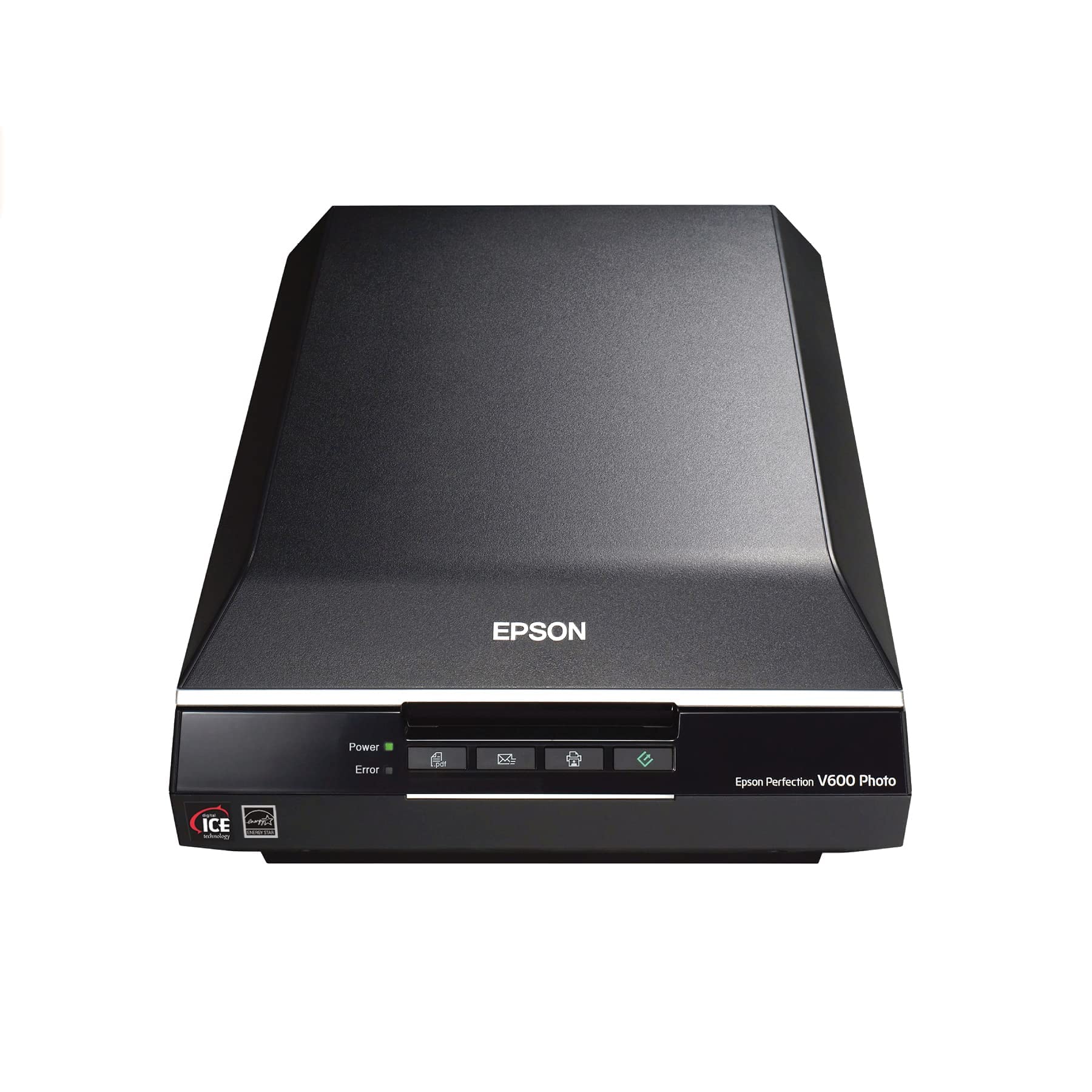
Epson Perfection V600 Photo Scanner
The classic flatbed for prints and film, with the resolution and dust removal that made it the default home photo scanner.
Strengths
- 6400 dpi optical resolution pulls fine detail from prints and film
- Digital ICE removes dust and scratches from film scans
- Built-in transparency unit handles slides and negatives without extra hardware
- Four one-touch buttons send scans straight to PDF, email, copy or file
Limitations
- Flatbed-only, so batch photo work is slow one sheet at a time
- No wireless connection and no automatic feeder
- High-resolution film scans take noticeable time per frame
- The lid and body take up real desk space for a home scanner
What owners report
Most praised
- Prints come out sharp with faithful color on the first pass
- Old slides and negatives look far better than expected after dust removal
- The buttons make repeat scanning quick once the workflow is set
Common complaints
- Scanning a large print collection feels slow because each photo is placed by hand
- The bundled software feels dated and takes a while to learn
- High-resolution scans of film can take a long time per frame
| Resolution | 6400 dpi optical resolution |
|---|---|
| Type | Flatbed photo scanner |
| Media | Film, slides, negatives, prints, documents |
| Dust removal | Digital ICE technology |
| Buttons | Four one-touch buttons for PDF, email, copy, scan |
| Certification | ENERGY STAR qualified |
Best for: Home archiving of prints, slides and negatives where one scanner has to handle the whole box.
Skip if: You need to feed a stack of prints quickly, since every original is placed by hand on the glass.
Best budget office scanner
Canon imageFORMULA R40 Office Scanner
A compact office document scanner with a 60-sheet feeder and one-touch job buttons.

Strengths
- 60-sheet feeder with duplex scanning at up to 80 ipm in black and white
- 40 ppm speed for black-and-white pages
- CaptureOnTouch software with one-touch job buttons
- Handles a wide range of document sizes and types
Limitations
- 600 dpi resolution is modest for photo enlargements
- No flatbed for books, thick originals or fragile prints
- USB 2.0 only, with no Wi-Fi
- The two-year warranty is short for the price
What owners report
Most praised
- Paperwork disappears into searchable files quickly
- The job buttons make repeat scans a one-press task
- Mixed paper sizes feed through without constant adjusting
Common complaints
- Photos come out softer than on a dedicated photo flatbed
- There is nowhere to scan a book page or a thick original
- The CaptureOnTouch interface looks old next to modern apps
| Speed | 40 ppm black and white |
|---|---|
| Feeder | 60-sheet document feeder |
| Duplex | Duplex scanning, 80 ipm black and white |
| Resolution | 600 dpi optical resolution |
| Software | CaptureOnTouch software included |
| Systems | Works with Windows and Mac |
Best for: Home offices digitizing paperwork, with photos handled as a secondary job.
Skip if: You mainly scan film or bound originals, since this is a feeder-only document scanner.
Best premium value
Fujitsu ScanSnap iX1600 Wireless Scanner
A fast wireless document scanner with a touchscreen that also handles photos and receipts.

Strengths
- 40 ppm duplex speed clears a stack quickly
- 4.3-inch touchscreen stores up to 30 scan profiles
- 50-sheet feeder handles mixed documents
- Wi-Fi and USB send scans to cloud, phone or computer
Limitations
- 600 dpi ceiling is modest for detailed photo work
- No flatbed, so bound books and fragile originals cannot be scanned
- The white body shows dust and marks easily
- The price sits above simpler photo scanners
What owners report
Most praised
- The touchscreen makes repeat jobs a single tap
- Duplex scanning captures both sides without flipping pages
- Receipts and photos feed through without fuss
Common complaints
- Fragile old photos need care because there is no flatbed option
- The software takes a while to learn for first-time users
- The white finish marks easily on a busy desk
| Speed | 40 ppm duplex scanning |
|---|---|
| Screen | 4.3-inch touchscreen |
| Feeder | 50-sheet automatic document feeder |
| Resolution | 600 dpi optical resolution |
| Connection | Wi-Fi and USB connectivity |
| Media | Scans photos, documents and receipts |
Best for: A home office that needs quick duplex scanning of documents, photos and receipts in one unit.
Skip if: You need high-resolution film or print archiving, since 600 dpi and a feeder suit documents first.
Questions, answered
How much should I spend on a photo scanner?
For a few dozen prints a year, a budget slim flatbed like the Canon LiDE 300 does the job honestly. For regular archiving, step up to the LiDE 400 or the Epson V39 II. For film, or for a whole family archive, the Epson Perfection V600 is the honest minimum, because no budget scanner here scans negatives.
Is a cheap photo scanner good enough?
For everyday prints shared online, yes: a cheap slim flatbed with a decent optical resolution scans cleanly. Where cheap scanners fail is film, enlargements and batch speed, so match the scanner to the originals. A cheap scanner bought for the wrong originals is not a bargain, it is a second purchase waiting to happen.
Should I buy a scanner or use a scanning service?
For a small collection, a budget flatbed is cheaper than a service and you keep the originals at home. For thousands of prints or slides, compare the service price against a feeder like the FastFoto FF-680W: the feeder pays for itself on a large collection, and you control the quality. For fragile or valuable originals, a service with careful handling may still be the safer choice.
How long does a photo scanner last?
A flatbed scanner has almost no moving parts beyond the sensor carriage, so a good one lasts many years with basic care: keep the glass clean, keep dust out, and do not force the lid. Feeders wear faster, because rollers age and need cleaning or replacement, and their useful life depends on how many pages they feed.
Every guide on Photo Scanners15 pages
- Topic hubPhoto Scanners
- Best ofThe Best Scanners for Photos (2027)
- Old photos are three different jobs wearing one name. Loose prints in a shoebox want a feeder, because a flatbed places each one by hand and a thousand prints at one minute each is a lost weekend. Fragile prints, prints glued into albums and oversized originals want a flatbed, because a feeder roller will damage them. And slides and negatives want film handling with dust removal, because a print scanner cannot see through film at all. This ranking weights the job first and the scanner second, so the feeder leads for loose prints, the flatbed leads for fragile ones, and the film tools rank on dust removal rather than speed.The Best Scanners for Old Photos (2027)
- A flatbed is the only scanner that takes almost anything: prints, film in holders, pages from a bound album, a fragile print that would never survive a roller, an object too thick for a feeder. This ranking weights the glass first: optical resolution for the detail, a transparency unit for film, dust removal for old negatives, and a lid that rises for thick originals. Feeders appear at the bottom only as honest alternatives, for buyers who came looking for a flatbed and actually need speed more than they need the glass.The Best Flatbed Photo Scanners (2027)
- ReviewEpson Perfection V600 Photo Scanner Review (2027)
- ReviewEpson Perfection V850 Pro Photo Scanner Review (2027)
- ReviewEpson FastFoto FF-680W Photo Scanner Review (2027)
- ReviewEpson Perfection V550 Photo Scanner Review (2027)
- ReviewPlustek ePhoto Z300 Photo Scanner Review (2027)
- ReviewCanon CanoScan LiDE 400 Slim Scanner Review (2027)
- Head to headEpson Perfection V600 Photo Scanner vs Epson Perfection V850 Pro Photo Scanner (2027)
- Head to headEpson FastFoto FF-680W Photo Scanner vs Plustek ePhoto Z300 Photo Scanner (2027)
- Buying guidePhoto Scanner Buying Guide (2027)
- Fix itPhoto Scanner Giving Blurry or Streaked Scans? Fixes (2027)